Cursive Logo Design: Free Font Generator Hacks for Brands
In the crowded digital marketplace, creating a unique brand identity is more important than ever. You want a logo that connects with your audience, tells a story, and stands out. Elegant cursive typography often achieves this perfectly, but it comes with challenges. Professional fonts can be expensive, and design software can be complicated.
So, how can you create a stunning cursive logo without a big budget or years of design experience?
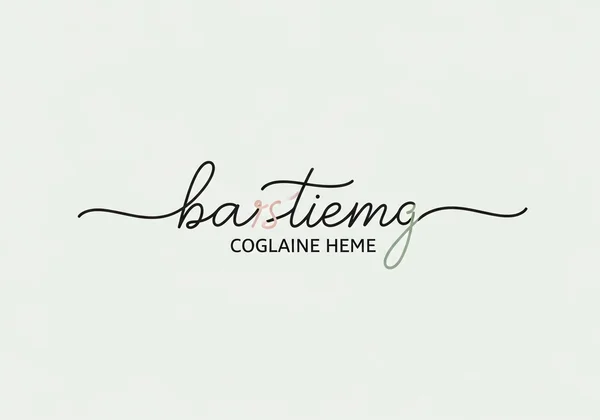
Here’s the good news: Our tool cuts the complexity while keeping results stunning. A powerful online tool can unlock professional-level branding in just a few clicks. This guide will show you how to use our versatile tool to design a memorable logo and build a cohesive brand identity. We'll explore why cursive works so well and provide practical hacks to make your brand look its best, all without spending a dime. Let’s craft a cursive logo that feels authentically you – no design degree required. Get started with our free font generator.
Why Cursive Logos Stand Out for Modern Branding
In an age of clean, minimalist design, a cursive logo can be a powerful differentiator. It breaks away from the sea of generic sans-serif fonts and adds a distinctly human element to your brand. This isn’t just about looks – it’s strategy. Your cursive style shapes customer perceptions.
The Emotional Impact of Elegant Script
Handwritten script connects with us on a psychological level. Unlike sterile, blocky text, cursive flows with a natural rhythm that feels personal and authentic. This style can instantly evoke feelings of warmth, elegance, sophistication, or creativity.
Think about it: a wedding planner’s logo in a delicate script feels romantic and exclusive. A craft bakery’s logo in a friendly, rounded cursive feels warm and homemade. This emotional connection builds trust and makes your brand more memorable. By choosing a cursive logo, you're not just showing your company name; you're communicating its personality and values.
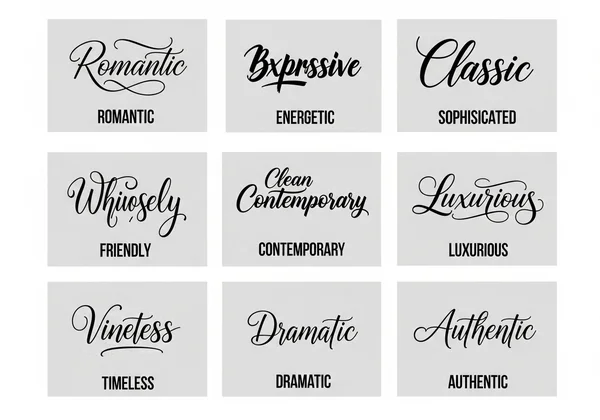
Identifying the Right Cursive Style for Your Brand Identity
Not all cursive is the same. The style you choose must align perfectly with your brand’s core identity. Before you start designing, ask yourself:
- What is my brand's personality? Is it luxurious and formal, or casual and playful? Is it modern and edgy, or traditional and trustworthy?
- Who is my target audience? A younger, trend-focused audience might respond to a bold, brush-stroke script, while an older, more established clientele might prefer a classic, refined cursive.
- Where will the logo be used? The script must be legible on everything from a tiny social media icon to a large storefront sign.
Law firms benefit from formal, slanted scripts. For kids' brands? Try a playful, upright cursive. Take a moment to define your brand's voice, and you'll be able to select a cursive style that speaks directly to your ideal customer.
Your Step-by-Step Workflow with Our Free Cursive Font Generator
Creating a professional-looking cursive design doesn't require complex software or expensive subscriptions. With a smart workflow, you can generate beautiful typography for your brand in minutes. Our platform is designed to be intuitive, fast, and completely free.
Let’s walk through the simple steps to bring your brand name to life.
Input, Generate, and Customize: Mastering Your Cursive Text
The process is refreshingly straightforward. The goal is to get you from idea to a usable design as quickly as possible.
-
Input Your Text: Navigate to the Cursive Font Generator on our website. In the text box, type your brand name, tagline, or any other text you want to transform.
-
Generate and Browse: The tool will instantly convert your text into a variety of cursive styles. Scroll through the options to see how your name looks in different fonts. Some are bold and modern, others are delicate and classic.
-
Select and Copy: Once you find a style that captures your brand’s essence, simply click the "copy" button. The styled text is now ready to be pasted into your design project, social media post, or document.
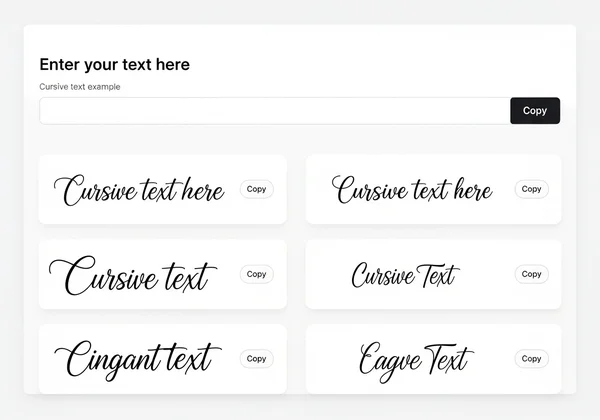
This simple copy-and-paste functionality means you don't have to download or install any files. It’s a seamless way to experiment with different looks until you find the perfect one.
Fine-Tuning for Perfection: Kerning, Scale, and Spacing Tips
Generating text is step one. For a polished logo, refine your design after pasting it into tools like Canva or Illustrator. To achieve a truly professional logo, consider these expert tips:
- Adjust Kerning (Letter Spacing): Kerning is the space between individual letters. Sometimes, automated fonts can have slightly awkward gaps. Manually adjust the spacing between specific letters to create a more natural, balanced flow. The goal is for the text to look like it was written in a single, effortless stroke.
- Manage Scale and Hierarchy: Your cursive logo should be the star. If you're pairing it with a tagline, make sure the cursive brand name is larger and more prominent. Use a simple, clean font for the tagline to avoid visual clutter and ensure readability.
- Give It Room to Breathe: Don't crowd your beautiful cursive logo. Ensure there is plenty of negative space (empty space) around it. This makes the logo feel more important and prevents it from getting lost in other design elements on a webpage or business card.
Beyond Logos: Expanding Your Cursive Brand Typography
A great brand identity is consistent. Once you've created your cursive logo, don't stop there. The cursive style you've chosen can become a powerful brand asset across all your marketing materials, creating a cohesive and memorable experience for your customers. Using your signature script consistently reinforces your brand’s personality everywhere it appears.
Integrating Cursive into Packaging, Headers, and Social Media
Your cursive text is incredibly versatile. Think beyond the logo and consider where else you can use it to add a touch of elegance and personality.
Here are a few ideas:
-
Website Headers: Use your cursive style for the main headlines on your website to immediately establish your brand’s tone.
-
Social Media Graphics: Create stunning quote graphics, announcements, or story highlights using your brand’s script. It makes your feed instantly recognizable.
-
Product Packaging: A thank-you message or product name in cursive on your packaging adds a personal touch that customers appreciate.
-
Email Signatures: Reinforce your brand identity in every email you send by including your name or company tagline in your signature cursive style.
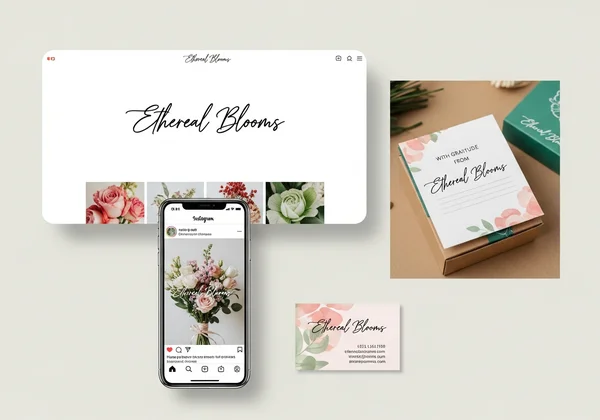
By using the same script in multiple places, you build brand recognition and create a professional, unified look. You can try the generator to create text for all these applications.
Visualizing Your Brand: Mockup Templates for Impact
Before you finalize your branding, it’s crucial to see how it looks in the real world. Mockups are a fantastic way to do this without spending money on printing. A mockup is a template where you can place your design to see how it would look on a physical object.
Use your generated cursive text and place it on free mockup templates for:
- Business cards
- T-shirts and apparel
- Coffee mugs
- Website landing pages
- Storefront signs
This step helps you catch potential issues with legibility or sizing early on. It also gets you excited about your brand's potential and ensures the style you chose is versatile enough for all your needs.
Leveraging Free Tools for Professional Branding Success
Many entrepreneurs and designers believe that professional branding requires a significant financial investment. While that was once true, powerful free tools have changed the game. You can now achieve a high-end look without the high-end price tag, as long as you know where to look and how to use the resources available.
Why Our Tool Outperforms Paid Font Libraries
Paid font libraries certainly offer vast collections, but they aren't always the best solution, especially for new brands or specific projects. Here’s why a free, dedicated tool like ours can be a smarter choice:
- Speed and Efficiency: You don't need to search through thousands of fonts, purchase a license, download files, and install them. You just type, copy, and paste. This saves you valuable time.
- Zero Cost: For startups, solopreneurs, and designers working on mockups, being able to create unlimited options for free is a huge advantage. It allows for creative freedom without financial risk.
- Simplicity and Accessibility: Our tool works in your browser on any device. There's no software to learn, making it accessible to everyone, regardless of their technical skill level. You can explore the tool right now.
Understanding Commercial Use: What You Need to Know
A common question about free tools is whether the output can be used for commercial purposes, like in a logo for a business that makes money. With our free cursive font tool, the text you create is designed for versatility. You can confidently use it for your commercial branding projects.
This empowers you to build your brand from the ground up without worrying about complex licensing fees. It’s part of our mission to make the art of cursive accessible to everyone for every purpose, whether it's for learning, personal projects, or professional brand building.
Craft Your Brand's Distinctive Cursive Identity Today
Building a memorable brand doesn't have to be complicated or expensive. With the right approach and the right tools, you can design a beautiful, emotionally resonant cursive logo that truly represents your business. We've seen how elegant script can make your brand stand out and how a simple workflow can produce professional results.
The key is to choose a style that reflects your brand's personality, refine the details for a polished look, and apply it consistently across all your materials.
Ready to create a signature look that will captivate your audience? The power to design is at your fingertips. Visit our free, easy-to-use generator and start designing today!
Frequently Asked Questions About Cursive Logo Design
Can I use the generated cursive for commercial logos and branding?
You bet! The text you create is completely free for commercial use. Feel free to use it for logos, marketing materials, merch, and your complete brand identity—no strings attached.
How do I choose the best cursive style from the generator for my brand?
It all comes down to your brand’s personality. Ask yourself: is my brand modern, traditional, playful, or elegant? Scroll through the styles and pick one that just feels right. Pro tip: test a few of your favorites on mockups to see them in action before you decide!
Is the font generator truly free for business use?
Yes, 100%! Our font generator is truly free for any project, business or personal. Our mission is to provide great creative tools without hidden fees, subscriptions, or complex licensing. What you see is what you get.
What are best practices for integrating cursive into an existing logo design?
Great question! If you already have a logo, cursive works beautifully for a tagline or secondary text. The key is to find a style that complements your existing design, not competes with it. Make sure there’s a clear visual hierarchy so your design stays clean and easy to read.
How can I save and export my generated cursive text for design software?
It couldn't be simpler—it's all copy-and-paste. Just generate your text, hit 'copy,' and paste it directly into your favorite design software like Canva, Photoshop, or even a Word doc. It pastes as live text, so you can easily change the color, size, and position. You can create your text in just a few seconds